Showing posts with label MPLS. Show all posts

Monday, October 20, 2014

Lab 3 - MPLS Label Filtering

MPLS labels are localy significant, 4 byte identifiers attached as header to an IP packet and used to create a Forwarding Equivalency Class. A Forwarding Equivalency Class or FEC is a set of MPLS packets which have similar characteristics and are forwarded over the same path. Since MPLS labels are use to ultimately create a FIB and populate CEF, filtering what labels are advertised and received help achieve efficiency as well as assist with traffic engineering tasks. Today's lab will look at filter LDP MPLS labels.

Concepts tested
  • Enable LDP and establish basic LDP peering
  • limit advertisement of MPLS labels 
  • Ensure full reach-ability over the MPLS VPN for the unfiltered labels.
Topology


Lab Tasks

  • Configure LDP peering between all routers using their directly connected interfaces as their transport interface.
  • Ensure the LDP router-id for each router is its loopback0 address
  • Ensure the MPLS forwarding table for each router only sees FEC's for R1 and R4 loopback addresses.
  • R1 and R4 should be able to ping each others loopback interfaces over the MPLS VPN when sourced from their respective loopback's.


GNS3 configuration file, requires IOS v15 for the 7200 router: Link


Solution

R1 Configuration

R1(config)#mpls ip
R1(config)#mpls ldp router-id loopback 0 force
R1(config)#int g0/0
R1(config-if)#mpls ldp discovery transport-address interface
R1(config-if)#mpls ip

R2 Configuration

R2(config)#mpls ip
R2(config)#mpls ldp router-id loopback 0 force
R2(config)#int g0/0
R2(config-if)#mpls ldp discovery transport-address interface
R2(config-if)#mpls ip
R2(config-if)#int g1/0
R2(config-if)#mpls ldp discovery transport-address interface
R2(config-if)#mpls ip


R3 Configuration

R3(config)#mpls ip
R3(config)#mpls ldp router-id loopback 0 force
R3(config)#int g0/0
R3(config-if)#mpls ldp discovery transport-address interface
R3(config-if)#mpls ip
R3(config-if)#int g1/0
R3(config-if)#mpls ldp discovery transport-address interface
R3(config-if)#mpls ip


R4 Configuration

R4(config)#mpls ip
R4(config)#int g0/0
R4(config-if)#mpls ldp discovery transport-address interface
R4(config-if)#mpls ip


With the configuration above in place we see we have a full mpls forwarding table.


But the lab tasks call for only R1 and R4's loopback addresses to have labels or a Forwarding Equivalency Class. So we need to filter the other prefixes.

R1 configuration

R1(config)#access-list 1 permit 11.0.0.0 0.0.255.255
R1(config)#access-list 1 permit 44.0.0.0 0.0.255.255
R1(config)#!
R1(config)#no mpls ldp advertise-labels
R1(config)#mpls ldp advertise-labels for 1

R2 configuration

R2(config)#access-list 1 permit 11.0.0.0 0.0.255.255
R2(config)#access-list 1 permit 44.0.0.0 0.0.255.255
R2(config)#!
R2(config)#no mpls ldp advertise-labels
R2(config)#mpls ldp advertise-labels for 1

R3 configuration

R3(config)#access-list 1 permit 11.0.0.0 0.0.255.255
R3(config)#access-list 1 permit 44.0.0.0 0.0.255.255
R3(config)#!
R3(config)#no mpls ldp advertise-labels
R3(config)#mpls ldp advertise-labels for 1

R4 configuration

R4(config)#access-list 1 permit 11.0.0.0 0.0.255.255
R4(config)#access-list 1 permit 44.0.0.0 0.0.255.255
R4(config)#!
R4(config)#no mpls ldp advertise-labels
R4(config)#mpls ldp advertise-labels for 1

R1 verification


R4 verification


With the added filter to the mpls ldp advertisements we only see labels associated with R4 and R1 loopback prefixes


Saturday, October 18, 2014

Lab 2 - MPLS LDP

MPLS LDP enables LSRs to discover other LDP peers and establish sessions with those potential peers for the purpose of exchanging label binding information. MPLS uses LDP and the exchanged label binding information to create label switching paths. In this lab we will look at the following LDP related concepts.

Concepts tested
  • LDP router ID
  • OSPF LDP Autoconfig
  • Direct and indirect LDP peering
  • Targeted LDP peering
  • LDP discovery peering
  • LDP peering authentication

Lab Tasks:

  • Enable MPLS LDP peering using UDP multicast between R1-R2 using their directly connected interfaces for the LDP tcp peering connection.
  • Use only a single command on R1 to enable LDP on all OSPF enabled interfaces
  • Enable MPLS LDP between R2-R3 using UDP unicast ensure that router R2 is the active LSR router for that peering session and that their loopback addresses are used to establish the LDP tcp peering connection.
  • Enable MPLS LDP between R1-R3 using LDP IGP synchronization using the routers directly connnected links for TCP session establishment.
  • Ensure each router's LDP router ID is the local LSRs loopback 0 address.
  • Enable authentication on all LDP sessions using MD5 with the password CCIE
  • OSPF has been configured already for you.

GNS3 configuration file, requires IOS v15 for the 7200 router: Link


Solution Below:

R1 Configuration

R1(config)#mpls ip
R1(config)#mpls ldp router-id loopback 0 force
R1(config)#mpls ldp password required
R1(config)#mpls ldp neighbor 2.2.2.2 password CCIE
R1(config)#mpls ldp neighbor 3.3.3.3 password CCIE
R1(config)#int gig0/0
R1(config-if)#mpls ldp discovery transport-address interface
R1(config-if)#exit
R1(config)#int gig1/0
R1(config-if)#mpls ldp discovery transport-address interface
R1(config-if)#exit
R1(config)#router ospf 1
R1(config-router)#mpls ldp autoconfig
R1(config-router)#end
R1#

R2 Configuration

R2(config)#mpls ip
R2(config)#mpls ldp router-id loopback 0 force
R2(config)#mpls ldp password required
R2(config)#mpls ldp neighbor 1.1.1.1 password CCIE
R2(config)#mpls ldp neighbor 3.3.3.3 password CCIE
R2(config)#mpls ldp neighbor 3.3.3.3 targeted ldp
R2(config)#int g0/0
R2(config-if)#mpls ldp discovery transport-address interface
R2(config-if)#mpls ip
R2(config-if)#exit
R2(config)#end
R2#

R3 Configuration

R3(config)#mpls ip
R3(config)#mpls ldp router-id loopback 0 force
R3(config)#mpls ldp password required
R3(config)#mpls ldp neighbor 1.1.1.1 password CCIE
R3(config)#mpls ldp neighbor 2.2.2.2 password CCIE
R3(config)#mpls ldp password required
R3(config)#mpls ldp neighbor 1.1.1.1 password CCIE
R3(config)#mpls ldp discovery targeted-hello accept
R3(config)#int g0/0
R3(config-if)#mpls ldp discovery transport-address interface
R3(config-if)#mpls ip
R3(config-if)#exit
R3(config)#end
R3#

R1 Verification


R1#debug mpls ldp transport events
LDP transport events debugging is on
*Oct 18 12:17:03.091: ldp: Send ldp hello; GigabitEthernet0/0, src/dst 120.0.12.1/224.0.0.2, inst_id 0
*Oct 18 12:17:03.207: ldp: Send ldp hello; GigabitEthernet1/0, src/dst 120.0.13.1/224.0.0.2, inst_id 0

Above verifies that R1 is sending hellos to the all routers multicast address 224.0.0.2 as required by the lab tasks.

%LDP-5-NBRCHG: LDP Neighbor 2.2.2.2:0 (1) is UP

After the multicast hellos are sent and received LDP peering is established with both R2 and R3.

Below shows that the TCP connection was established using the directly connected interfaces and MD5 authentication was used.

R1#sh mpls ldp neighbor detail
    Peer LDP Ident: 2.2.2.2:0; Local LDP Ident 1.1.1.1:0
        TCP connection: 120.0.12.2.39350 - 120.0.12.1.646; MD5 on
        Password: required, neighbor, in use
        State: Oper; Msgs sent/rcvd: 28/28; Downstream; Last TIB rev sent 12
        Up time: 00:16:54; UID: 1; Peer Id 0
        LDP discovery sources:
          GigabitEthernet0/0; Src IP addr: 120.0.12.2
            holdtime: 15000 ms, hello interval: 5000 ms
        Addresses bound to peer LDP Ident:
          120.0.12.2      120.0.23.2      2.2.2.2
        Peer holdtime: 180000 ms; KA interval: 60000 ms; Peer state: estab
        Capabilities Sent:
<snip>
    Peer LDP Ident: 3.3.3.3:0; Local LDP Ident 1.1.1.1:0
        TCP connection: 120.0.13.3.34335 - 120.0.13.1.646; MD5 on
        Password: required, neighbor, in use
        State: Oper; Msgs sent/rcvd: 13/13; Downstream; Last TIB rev sent 12
        Up time: 00:04:08; UID: 2; Peer Id 1
        LDP discovery sources:
          GigabitEthernet1/0; Src IP addr: 120.0.13.3
            holdtime: 15000 ms, hello interval: 5000 ms
        Addresses bound to peer LDP Ident:
          120.0.23.3      120.0.13.3      3.3.3.3
        Peer holdtime: 180000 ms; KA interval: 60000 ms; Peer state: estab
        Capabilities Sent:
<snip>

R2 Verification

R2#debug mpls ldp transport events
LDP transport events debugging is on
ldp: Send ldp dir hello; no interface, src/dst 2.2.2.2/3.3.3.3, inst_id 0
ldp: Send ldp hello; GigabitEthernet0/0, src/dst 120.0.12.2/224.0.0.2, inst_id 0

Above shows R2 sending a multicast LDP hello to R1 and a directed LDP hello to R3 as required.

%LDP-5-NBRCHG: LDP Neighbor 1.1.1.1:0 (1) is UP
%LDP-5-NBRCHG: LDP Neighbor 3.3.3.3:0 (2) is UP

Peering is established with both R1 and R3.

R2#sh mpls ldp neighbor detail
    Peer LDP Ident: 1.1.1.1:0; Local LDP Ident 2.2.2.2:0
        TCP connection: 120.0.12.1.646 - 120.0.12.2.39350; MD5 on
        Password: required, neighbor, in use
        State: Oper; Msgs sent/rcvd: 37/36; Downstream; Last TIB rev sent 12
        Up time: 00:24:07; UID: 1; Peer Id 0
        LDP discovery sources:
          GigabitEthernet0/0; Src IP addr: 120.0.12.1
            holdtime: 15000 ms, hello interval: 5000 ms
        Addresses bound to peer LDP Ident:
          120.0.12.1      120.0.13.1      1.1.1.1
        Peer holdtime: 180000 ms; KA interval: 60000 ms; Peer state: estab
        Capabilities Sent:
<snip>
    Peer LDP Ident: 3.3.3.3:0; Local LDP Ident 2.2.2.2:0
        TCP connection: 3.3.3.3.27549 - 2.2.2.2.646; MD5 on
        Password: required, neighbor, in use
        State: Oper; Msgs sent/rcvd: 30/31; Downstream; Last TIB rev sent 12
        Up time: 00:19:37; UID: 2; Peer Id 1
        LDP discovery sources:
          Targeted Hello 2.2.2.2 -> 3.3.3.3, active;
            holdtime: infinite, hello interval: 10000 ms
        Addresses bound to peer LDP Ident:
          120.0.23.3      120.0.13.3      3.3.3.3
        Peer holdtime: 180000 ms; KA interval: 60000 ms; Peer state: estab
        Clients: Dir Adj Client
        Capabilities Sent:
<snip>

Above verifies TCP connectivity per the lab requirements as well as MD5 authentication.

R3 Verification

R3#debug mpls ldp transport events
LDP transport events debugging is on
ldp: Rcvd ldp dir hello to 3.3.3.3 from 2.2.2.2 (2.2.2.2:0); GigabitEthernet0/0; opt 0xF
ldp: Send ldp hello; GigabitEthernet1/0, src/dst 120.0.13.3/224.0.0.2, inst_id 0

Above verifies that R3 is sending a multicast hello to R1 and receiving a directed hello from R2.

%LDP-5-NBRCHG: LDP Neighbor 2.2.2.2:0 (1) is UP
%LDP-5-NBRCHG: LDP Neighbor 1.1.1.1:0 (2) is UP

Above verifies LDP peering with R1 and R2.

R3#sh mpls ldp neighbor det
    Peer LDP Ident: 2.2.2.2:0; Local LDP Ident 3.3.3.3:0
        TCP connection: 2.2.2.2.646 - 3.3.3.3.27549; MD5 on
        Password: required, neighbor, in use
        State: Oper; Msgs sent/rcvd: 38/37; Downstream; Last TIB rev sent 12
        Up time: 00:25:40; UID: 1; Peer Id 0
        LDP discovery sources:
          Targeted Hello 3.3.3.3 -> 2.2.2.2, passive;
            holdtime: 90000 ms, hello interval: 10000 ms
        Addresses bound to peer LDP Ident:
          120.0.12.2      120.0.23.2      2.2.2.2
        Peer holdtime: 180000 ms; KA interval: 60000 ms; Peer state: estab
        Capabilities Sent:
<snip>
    Peer LDP Ident: 1.1.1.1:0; Local LDP Ident 3.3.3.3:0
        TCP connection: 120.0.13.1.646 - 120.0.13.3.34335; MD5 on
        Password: required, neighbor, in use
        State: Oper; Msgs sent/rcvd: 28/29; Downstream; Last TIB rev sent 12
        Up time: 00:17:23; UID: 2; Peer Id 1
        LDP discovery sources:
          GigabitEthernet1/0; Src IP addr: 120.0.13.1
            holdtime: 15000 ms, hello interval: 5000 ms
        Addresses bound to peer LDP Ident:
          120.0.12.1      120.0.13.1      1.1.1.1
        Peer holdtime: 180000 ms; KA interval: 60000 ms; Peer state: estab
        Capabilities Sent:
<snip>

Above verifies TCP connectivity per the lab requirements as well as MD5 authentication.


Sources:

http://www.cisco.com/c/en/us/td/docs/ios/12_4t/12_4t2/ftldp41.html#wp1651403

http://www.cisco.com/c/en/us/td/docs/ios/12_4t/12_4t2/ftldp41.html

http://www.cisco.com/c/en/us/td/docs/ios-xml/ios/mp_ldp/configuration/12-4m/mp-ldp-12-4m-book.pdf


Thursday, October 16, 2014

Lab 1 - MPLS VRF-Lite

VRF lite is a feature that adds an additional identifier to each prefix assigned to a VRF called a route-distinguisher. As the name suggests the route-distinguisher (RD) provides an additional value to a prefix to distinguish it from other routes in the global routing table. Essentially creating multiple routing tables distinguishable by the RD. By assigning interfaces to a VRF the prefixes whether they are connected, static, or dynamically learned are assigned the VRF's RD and are stored separately in the VRF's RIB and CEF is updated accordingly to allow proper routing and packet switching. You can view each vrf's RIB with the following command:

R1#show ip route vrf vrf_name

In fact, for most information specific to a VRF such as assigned interfaces or IGP/EGP information, it is necessary to use the vrf option in the command to tell the cli that you are interested in information related to that specific vrf. Today's lab will focus on this feature and how to configure it.

Concepts tested
  •  Configuring VRF'S
  • Assigning interfaces to a VRF
  • Configuring per VRF EIGRP address families

Complete the following tasks:
  • Create loobpack1 interfaces on routers R1, R2, and R4 routers using IP x.x.x.x/32 where x is the router number for the given router. These IP's will overlap with the next task.
  • Create loopback2 interfaces on routers R1, R2, and R3 routers using IP x.x.x.x/32 where x is the router number for the given router.
  • Configure R1 to R4 communication through R2 using the subnets shown in the lab topology.
  • Do not use any tunneling or overlay solution to accomplish this task
  • Also configure R1 to communicate with R3 through R2 using the subnets shown in the lab
  • Enable EIGRP to advertise R1,R2 and R4's loopback1 interface IP's with each other using only a single instance.
  • Use the same EIGRP instance to advertise R1's, R2's,  and R3's loopback2 address with each other.
  • Confirm full connectivity between R1, R2, and R4 using the loopback1 addresses and do the same for R1, R2, and R3 for the loopback2 interfaces.


GNS3 configuration file, requires IOS v15 for the 7200 router: Link

Solution Below:

To begin create two VRF's on R1 and R2 so that R1-R4 addressing is isolated from R1-R3 addressing. Create a unique route distinguisher (RD) in the form of ASN:nn or ASN:x.x.x.x.


The last step of entering address-family mode and then exiting may seem unnecessary but it's not. Doing so activates IPV4 for this VRF instance. If you do not do this you will receive the following error when attempting to assign the IPV4 addresses to a VPN_A VRF assigned interface.


Next assign interface Gig0/0 to VRF VPN_A and configure its IP address.


Now configure the same IP address on Gig 1/0, don't forget to no shut each interface.


Without Gig0/0 being assigned to VRF VPN_A you would not normally be able to assign the same IP address to two different non-point-to-point interfaces. But because interface Gig0/0 is allocated to VRF VPN_A there is no conflict.


Only interface Gig1/0 is in the global routing table.


Interface gig0/0 is in the VRF VPN_A routing table.


Now perform similar tasks on R2 to allow for the duplicate addressing.


Now configure R2 to R3 and R2 to R4 addressing.


Something to point out here is that if your forget to use the VRF forwarding command on interface s2/1 the cli will not complain about duplicate subnets. This not the case with R1, if you had forgotten to apply the VRF forwarding command before the IP address on Gig 0/0 you would have received an error from the CLI similar to the one in the picture below. With R2 the command is allowed because the interfaces are point-to-point and the default encapsulation is HDLC.


If you look at the CEF table you will see the duplicate paths are treated as load balanced paths. This is considered a valid configuration but is more commonly seen with PPP/MPPP


Next we need to create our loopback addresses.


With all interface addressing out of the way we can move on to enabling and configuring  EIGRP.


Now let's look at what was done here. First we created a named EIGRP process called VRF_LITE. With named EIGRP processes you can create and modify multiple EIGRP instances based on addresses family and VRF association. So with the first address-family command I am creating an IPV4 EIGRP instance AS 1 for the global routing table. The second address-family I am create another separate EIGRP instance AS 1 for the VRF VPN_A. Both instances operate as separate EIGRP instances and they do not share an EIGRP topology table.

Now let's continue with our EIGRP configuration on R2,R3, and R4.


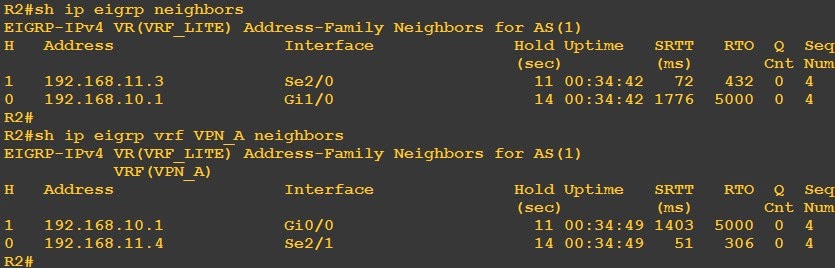
Now we see our neighbors come up


R3 and R4 our more conventional EIGRP configuration


Now we can look at our routing tables and neighbors to see if we have missed anything


So far everything look pretty good. The final test is to confirm connectivity between our loopbacks.


Looks goods, and that it!